How to Inspect a Parquet File's Schema, Types and Row Groups
To inspect a Parquet file's schema, open the Parquet Viewer and drop the file on it. The header shows the row and column counts, the Schema tab lists every column with its DuckDB type, and the Preview tab shows the first 100 rows. For the Parquet-level details (physical types, row groups, min/max statistics and null counts), run parquet_schema() and parquet_metadata() in the viewer's Query tab. The viewer doesn't show those on its own.
The viewer runs DuckDB v1.1.1 (DuckDB-Wasm 1.29.0) in your browser. It reads the file locally and doesn't upload it. Every output below was produced by that engine from the sample file.
Sample file
Download orders.parquet (78.7 KB). It has 5,000 orders in three row groups and covers the common column kinds: integer, text, date, decimal, a nullable text column, a list and a struct. Every 10th order has no coupon.
The file was written by this DuckDB statement. Run it in the DuckDB playground to make your own copy:
COPY (
  SELECT
    i AS order_id,
    ['West', 'East', 'North'][i % 3 + 1] AS region,
    DATE '2026-01-01' + (i // 50)::INTEGER AS order_date,
    ((i * 37) % 50000 / 100)::DECIMAL(10, 2) AS total,
    CASE WHEN i % 10 = 0 THEN NULL ELSE 'SAVE' || (i % 4 + 1) * 5 END AS coupon,
    ['SKU-' || (i % 7), 'SKU-' || (i % 5)] AS items,
    {'city': ['Austin', 'Boston', 'Denver'][i % 3 + 1],
     'zip': lpad((i % 900 + 100)::VARCHAR, 5, '0')} AS ship_to
  FROM range(1, 5001) t(i)
) TO 'orders.parquet' (FORMAT PARQUET, ROW_GROUP_SIZE 2048);
ROW_GROUP_SIZE 2048 splits the 5,000 rows into row groups of 2,048, 2,048 and 904 rows, so the metadata queries below have more than one group to show.
Open the file and read the schema
- Open the Parquet Viewer.
- Drop
orders.parqueton the page, or click the drop zone to choose it. - Read the header: orders.parquet, 78.7 KB, 5,000 rows, 7 columns.
- Open the Schema tab.
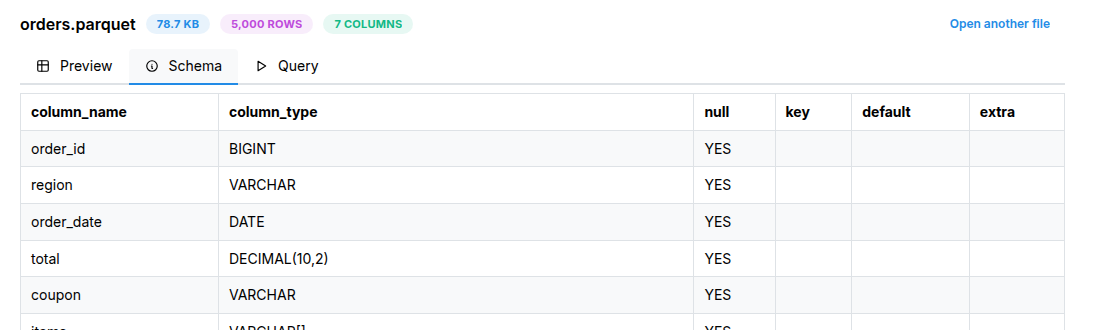
The Schema tab is the result of DESCRIBE SELECT * FROM 'orders.parquet':
column_name | column_type                       | null
------------|-----------------------------------|-----
order_id    | BIGINT                            | YES
region      | VARCHAR                           | YES
order_date  | DATE                              | YES
total       | DECIMAL(10,2)                     | YES
coupon      | VARCHAR                           | YES
items       | VARCHAR[]                         | YES
ship_to     | STRUCT(city VARCHAR, zip VARCHAR) | YES
The key, default and extra columns are empty for Parquet files, so they are left out here.
Read the types as follows:
VARCHAR[]is a list of strings. Each order'sitemsholds an array such as["SKU-1","SKU-1"].STRUCT(city VARCHAR, zip VARCHAR)is a nested record. Reach its fields with dot syntax:ship_to.city.null = YESmeans the column is allowed to hold nulls. It doesn't mean the column contains any. DuckDB writes every column as optional, so all seven showYES, but onlycouponactually has nulls. Count them to find out:
SELECT count(*) AS rows,
       count(coupon) AS with_coupon,
       count(*) - count(coupon) AS null_coupon
FROM 'orders.parquet';
rows | with_coupon | null_coupon
-----|-------------|------------
5000 | 4500        | 500
Look at sample rows
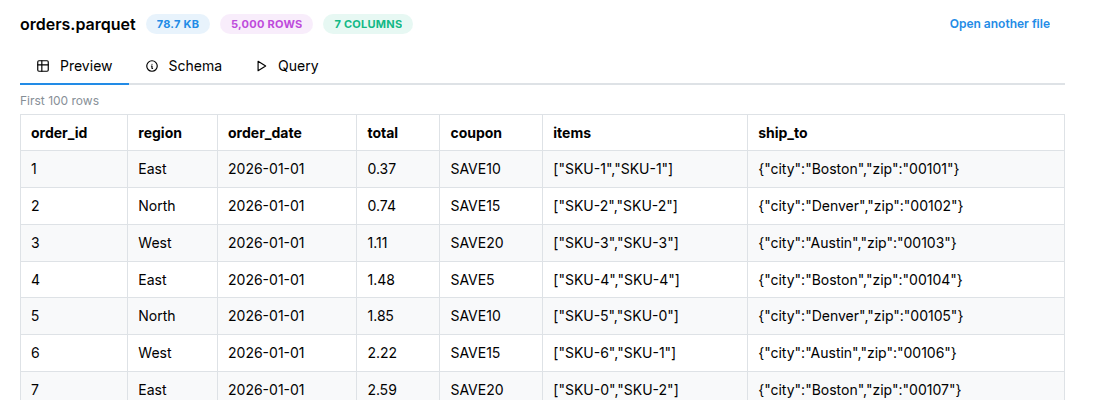
The Preview tab shows the first 100 rows. Lists and structs are shown as JSON:
order_id | region | order_date | total | coupon | items             | ship_to
---------|--------|------------|-------|--------|-------------------|--------------------------------
1        | East   | 2026-01-01 | 0.37  | SAVE10 | ["SKU-1","SKU-1"] | {"city":"Boston","zip":"00101"}
2        | North  | 2026-01-01 | 0.74  | SAVE15 | ["SKU-2","SKU-2"] | {"city":"Denver","zip":"00102"}
3        | West   | 2026-01-01 | 1.11  | SAVE20 | ["SKU-3","SKU-3"] | {"city":"Austin","zip":"00103"}
To see rows past the first 100, filter them in the Query tab. Struct fields work directly in the SELECT list:
SELECT order_id, order_date, total, items, ship_to.city AS city
FROM 'orders.parquet'
WHERE order_date BETWEEN DATE '2026-03-25' AND DATE '2026-03-26'
ORDER BY order_id
LIMIT 3;
order_id | order_date | total | items             | city
---------|------------|-------|-------------------|-------
4150     | 2026-03-25 | 35.50 | ["SKU-6","SKU-0"] | Boston
4151     | 2026-03-25 | 35.87 | ["SKU-0","SKU-1"] | Denver
4152     | 2026-03-25 | 36.24 | ["SKU-1","SKU-2"] | Austin
In the viewer, refer to the file by its name in single quotes, e.g. 'orders.parquet'. The Query tab starts with SELECT * FROM 'orders.parquet' LIMIT 100; already filled in.
Check the Parquet physical types
DESCRIBE shows the types DuckDB reads the columns as. The file itself stores a physical type (how the bytes are stored) and, for many columns, a logical or converted type (how to read those bytes). parquet_schema() shows both:
SELECT name, type, repetition_type, converted_type, logical_type
FROM parquet_schema('orders.parquet');
name          | type       | repetition_type | converted_type | logical_type
--------------|------------|-----------------|----------------|-----------------------------------
duckdb_schema |            | REQUIRED        |                |
order_id      | INT64      | OPTIONAL        | INT_64         |
region        | BYTE_ARRAY | OPTIONAL        | UTF8           |
order_date    | INT32      | OPTIONAL        | DATE           |
total         | INT64      | OPTIONAL        | DECIMAL        | DecimalType(scale=2, precision=10)
coupon        | BYTE_ARRAY | OPTIONAL        | UTF8           |
items         |            | OPTIONAL        | LIST           |
list          |            | REPEATED        |                |
element       | BYTE_ARRAY | OPTIONAL        | UTF8           |
ship_to       |            | OPTIONAL        |                |
city          | BYTE_ARRAY | OPTIONAL        | UTF8           |
zip           | BYTE_ARRAY | OPTIONAL        | UTF8           |
What this tells you:
- The first row,
duckdb_schema, is the root of the schema tree, not a column. order_dateis stored as anINT32day count markedDATE, andtotalas anINT64markedDECIMALwith scale 2. Other tools rely on those annotations. If one is missing, a reader sees plain integers instead.- Strings are
BYTE_ARRAYwithUTF8. - A list becomes three levels:
items→ aREPEATEDgroup calledlist→element. Struct fields (city,zip) appear as children ofship_to, which has no physical type of its own. OPTIONALis the Parquet form ofnull = YES.
Check row groups and column statistics
Parquet stores the data in row groups. For each column in each group it can store min/max values and a null count. Query engines use these to skip groups that can't match a filter. Start with the file-level summary:
SELECT created_by, num_rows, num_row_groups
FROM parquet_file_metadata('orders.parquet');
created_by                               | num_rows | num_row_groups
-----------------------------------------|----------|---------------
DuckDB version v1.1.1 (build af39bd0dcf) | 5000     | 3
parquet_metadata() returns one row per column per row group. Filter it to the columns you care about:
SELECT row_group_id, path_in_schema, stats_min, stats_max, stats_null_count
FROM parquet_metadata('orders.parquet')
WHERE path_in_schema IN ('order_date', 'coupon')
ORDER BY path_in_schema, row_group_id;
row_group_id | path_in_schema | stats_min  | stats_max  | stats_null_count
-------------|----------------|------------|------------|-----------------
0            | coupon         | SAVE10     | SAVE5      | 204
1            | coupon         | SAVE10     | SAVE5      | 205
2            | coupon         | SAVE10     | SAVE5      | 91
0            | order_date     | 2026-01-01 | 2026-02-10 | 0
1            | order_date     | 2026-02-10 | 2026-03-23 | 0
2            | order_date     | 2026-03-23 | 2026-04-11 | 0
Create the file and run this query in the DuckDB playground
Two things to notice:
- The
order_dateranges barely overlap. A filter such asorder_date >= DATE '2026-04-01'only needs row group 2. Data sorted on the filtered column gets this benefit. For randomly ordered data, every group's range tends to cover everything. - String statistics compare byte by byte, so
SAVE10is the minimum andSAVE5the maximum: the character1sorts before5. They are bounds for skipping row groups, not a sorted list of values.
The null counts (204 + 205 + 91) add up to the 500 nulls counted earlier.
Nested columns use a comma-separated path, such as items, list, element or ship_to, city. You can also see the encoding and compression for each column. The total_compressed_size and total_uncompressed_size columns give the stored size per column chunk.
SELECT path_in_schema, type, compression, encodings
FROM parquet_metadata('orders.parquet')
WHERE row_group_id = 0;
path_in_schema       | type       | compression | encodings
---------------------|------------|-------------|---------------------
order_id             | INT64      | SNAPPY      | PLAIN
region               | BYTE_ARRAY | SNAPPY      | PLAIN, RLE_DICTIONARY
order_date           | INT32      | SNAPPY      | PLAIN
total                | INT64      | SNAPPY      | PLAIN
coupon               | BYTE_ARRAY | SNAPPY      | PLAIN, RLE_DICTIONARY
items, list, element | BYTE_ARRAY | SNAPPY      | PLAIN
ship_to, city        | BYTE_ARRAY | SNAPPY      | PLAIN
ship_to, zip         | BYTE_ARRAY | SNAPPY      | PLAIN
Files from other writers can also carry key-value metadata. Some writers store their original schema there. Check with SELECT * FROM parquet_kv_metadata('orders.parquet');. For this DuckDB-written file it returns no rows.
Try it without downloading
Each link below writes orders.parquet inside the playground with the COPY statement above and then inspects it. Click Run. The playground shows the result of the last statement.
Limits
- File size: the viewer's drop zone accepts files up to 512 MB. It reads the whole file into browser memory before querying it, so the practical limit on a phone or a low-memory laptop is lower. For larger files, run the same queries in the DuckDB CLI.
- Preview: the Preview tab shows only the first 100 rows. Use the Query tab to look further.
- What the UI shows: the header and the Schema and Preview tabs cover columns, types, counts and sample rows. Physical types, row groups, statistics, compression and key-value metadata are only available through the SQL functions above.
- Engine version: the outputs above come from DuckDB v1.1.1. Other versions and other Parquet writers may report slightly different metadata columns or values.