Image to OpenSCAD
Photo to editable 3D
Your photo. Your next creation.
Turn everyday objects into editable OpenSCAD models. Explore a prepared example below, then try your own photo.
See the transformation
Explore prepared examples. No sign-in. No generation credits used.
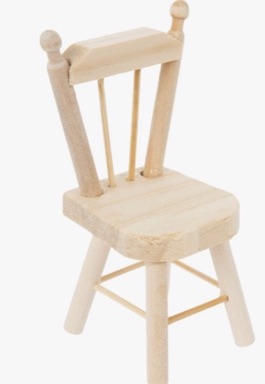
Input photo
Wooden chair
about 60 x 60 x 100 mm
Preparing the example in your browser…
Seat, splayed legs, stretchers, spindle back and ball finials. Seat size, leg splay and spindle count are variables.
Generating a new model requires sign-in. Free accounts get 3 photo tries; Premium unlocks downloads of generated models.
Bring your own photo.
A part on your desk. An idea worth making.
Measurements & details (optional)
Width x depth x height. Leave empty and the AI estimates it.
Holes, screw sizes, wall thickness, which side sits on the print bed.
Sign in with Google to try it free: 3 photo tries, and you can rotate and inspect every result.
Compare plans
Free account
- 3 photo tries
- Rotate and inspect the 3D model
Capture the shape
Brackets, knobs, hooks, stands. One object and a clear angle give the AI a useful starting point.
Dial in the details
Add known dimensions and important features. The model uses named measurements you can adjust.
Make it real
Inspect the model, then export with Premium. Check critical dimensions and printability before printing.
New to parametric modeling? Explore the OpenSCAD tutorial →