How to Compare JSON and Ignore Key Order (and Array Order)
To compare two JSON documents while ignoring key order, paste them into JSON Compare & Diff and click Compare. Before it builds the diff, the tool sorts the keys of every object at every level. A key that only moved never shows as a difference, and there is nothing to switch on.
Arrays work differently. The tool compares them position by position, so ["admin", "billing"] and ["billing", "admin"] show as changed, and it has no option to ignore array order. If order doesn't matter for your data, sort those arrays with jq first, as shown below.
The outputs below were checked in the site's JSON diff tool and jq playground (jq-web 0.5.1). The command-line examples were run with jq 1.8.1.
Same data, keys in a different order
before.json:
{
  "id": "u-42",
  "name": "Ana",
  "roles": ["admin", "billing"],
  "settings": { "theme": "dark", "locale": "de-DE" },
  "teams": [
    { "id": "t1", "name": "Core" },
    { "id": "t2", "name": "Ops" }
  ]
}
after.json has the same values. Its keys are reversed at the top level, inside settings, and inside each team:
{
  "teams": [
    { "name": "Core", "id": "t1" },
    { "name": "Ops", "id": "t2" }
  ],
  "settings": { "locale": "de-DE", "theme": "dark" },
  "roles": ["admin", "billing"],
  "name": "Ana",
  "id": "u-42"
}
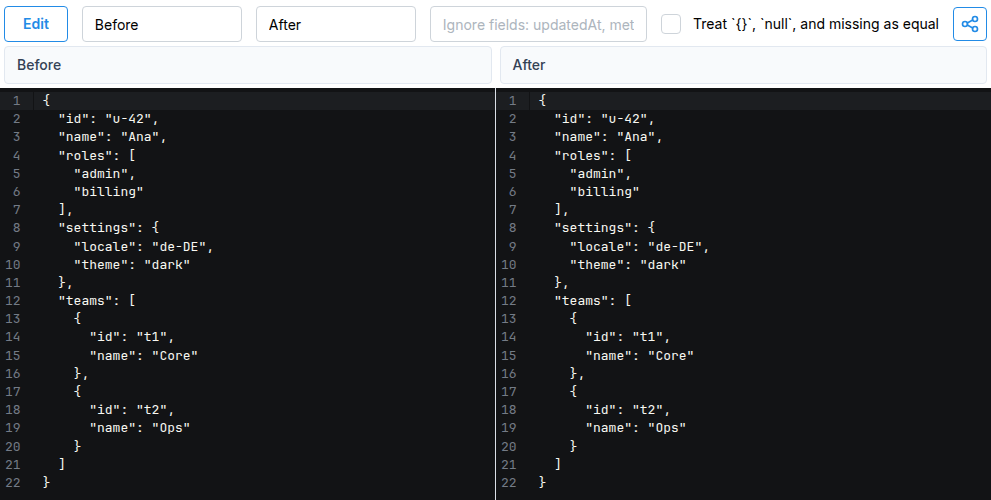
The diff shows both sides identical, with no highlighted lines:
Open this comparison in JSON Compare & Diff
The diff panes show normalized copies, not your original text: keys sorted alphabetically, pretty-printed with two-space indentation. Line numbers in the diff therefore won't match the line numbers in your files.
Ignoring key order is safe because JSON gives it no meaning. RFC 8259 defines an object as an unordered collection of name/value pairs, and an array as an ordered sequence of values.
Reordered arrays still show as changes
after-reordered.json is the same as after.json, except that roles and teams are listed in reverse order:
{
  "teams": [
    { "name": "Ops", "id": "t2" },
    { "name": "Core", "id": "t1" }
  ],
  "settings": { "locale": "de-DE", "theme": "dark" },
  "roles": ["billing", "admin"],
  "name": "Ana",
  "id": "u-42"
}
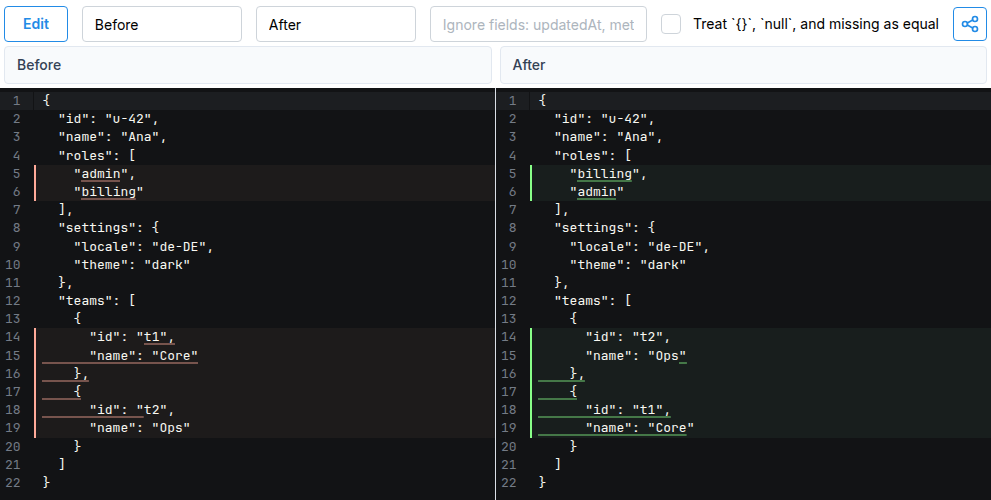
The key reordering is still ignored, but both arrays are highlighted: two lines in roles, and both team objects, because element 0 and element 1 changed places.
Open this comparison in JSON Compare & Diff
Whether this counts as a real change depends on your data, so a diff tool can't decide it for you:
- Order matters in a pipeline's steps, a ranking, a migration list, or a coordinate pair such as
[longitude, latitude]. - Order doesn't matter when the array is really a set, such as roles or tags, or when an API returns rows in no guaranteed order.
Ignore array order: sort the arrays first
Normalize both documents with the same jq filter, then compare the two outputs.
Sort only the arrays you know are sets. This is the safer choice when you know the shape of the document:
.roles |= sort | .teams |= sort_by(.id)
sort handles arrays of strings or numbers. sort_by(.id) orders objects by a field that identifies them. Run it on before.json and on after-reordered.json in the playground, then paste the two outputs into the diff. The result is no differences.
Sort every array, at any depth. Use this when every array in the document is a set:
walk(if type == "array" then sort else . end)
Run it on before.json and on after-reordered.json. The two outputs also compare with no differences. Keep in mind:
- It sorts every array, including ones where order means something.
- jq sorts arrays of objects by comparing their sorted key names first, then their values key by key. The order is deterministic, but you can't choose the field, unlike with
sort_by. - Sorting keeps duplicates, so
["a", "a", "b"]and["a", "b", "b"]are still different after sorting. Don't useuniquefor this step, because it would hide duplicates that differ. See removing duplicates in jq for when you do want them gone.
On the command line
jq -S (--sort-keys) prints objects with sorted keys, so a plain diff ignores key order:
diff <(jq -S . before.json) <(jq -S . after.json)
No output and exit status 0 mean the documents match. Arrays are still compared by position: the same command on after-reordered.json reports the roles and teams lines and exits with 1. <( ) is process substitution, which works in bash and zsh but not in plain sh.
For a yes/no answer, compare the parsed values. jq's == ignores key order but not array order:
jq -n --slurpfile a before.json --slurpfile b after.json '$a == $b'
# true

jq -n --slurpfile a before.json --slurpfile b after-reordered.json '$a == $b'
# false
Add the walk filter to ignore array order as well:
jq -n --slurpfile a before.json --slurpfile b after-reordered.json \
  '($a[0] | walk(if type == "array" then sort else . end)) == ($b[0] | walk(if type == "array" then sort else . end))'
# true
Text differences the tool treats as equal
The diff tool parses both sides with JavaScript's JSON.parse and compares the parsed values. Some differences in the original text are lost during parsing, so they never appear in the diff:
| Left | Right | Shown as |
|---|---|---|
{"a": 1, "b": 100, "c": 0.5} | {"a": 1.0, "b": 1e2, "c": 5e-1} | Equal. Both sides display 1, 100, 0.5 |
{"status": "draft", "status": "paid"} | {"status": "paid"} | Equal. Only the last duplicate key is kept |
{"id": 9007199254740993} | {"id": 9007199254740992} | Equal. Both sides display 9007199254740992 |
The last row matters for IDs. Integers above 253 lose precision in JavaScript, so the diff silently shows a different number from the one you pasted. Compare such values as strings, or use the command line: jq 1.8.1 printed 9007199254740993 unchanged, and 9007199254740993 == 9007199254740992 returned false.
Some differences do count:
- Type:
{"total": 10}and{"total": "10"}are shown as a change. nullversus a missing key:nulland a missing key are different, unless you tick Treat{},null, and missing as equal.
To skip fields that always change, such as timestamps or trace IDs, list them in Ignore fields. The tool's FAQ explains how the field names and dotted paths match.