How to Draw Edges Between Graphviz Clusters
To draw an edge from one cluster boundary to another, enable compound=true and set ltail and lhead to the cluster names. The edge still needs real nodes as its endpoints.
Connect two group boundaries
digraph Services {
  graph [rankdir=LR, compound=true];
  node [shape=box];
  subgraph cluster_frontend {
    label="Frontend";
    browser -> gateway;
  }
  subgraph cluster_backend {
    label="Backend";
    worker -> database;
  }
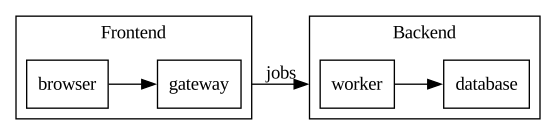
  gateway -> worker [ltail=cluster_frontend, lhead=cluster_backend, label="jobs"];
}
The jobs arrow starts at the Frontend boundary and ends at the Backend boundary. Gateway and Worker anchor its route but the line is clipped at the enclosing boxes.
Connect an outside node to a cluster
digraph Intake {
  graph [rankdir=LR, compound=true];
  node [shape=box];
  client [label="Client"];
  subgraph cluster_processing {
    label="Processing";
    validate -> store;
  }
  client -> validate [lhead=cluster_processing, label="submit"];
}
Only the destination is a cluster, so this edge needs lhead but no ltail. The arrow ends at the Processing boundary.
What to watch for
Names beginning with cluster tell the renderer to draw these subgraphs as clusters. Writing cluster_frontend -> cluster_backend instead creates nodes with those names; it does not connect the boxes.
The tail node must belong to the ltail cluster, and the head node must belong to the lhead cluster. When a boundary edge fails, check those memberships and confirm that compound=true is on the graph. These examples use the dot engine.
Related guides
- How to Align Graphviz Nodes on the Same Rank
- How to Add Multiline Labels in Graphviz
- Graphviz cheatsheet
Reference: Official documentation.