How to Align Graphviz Nodes on the Same Rank
With the dot layout engine, put nodes in { rank=same; ... } to align their centers on one rank. With the default top-to-bottom direction, that makes a horizontal row.
Place parallel steps on one row
digraph Build {
  graph [rankdir=TB, nodesep=0.6];
  node [shape=box];
  source -> lint;
  source -> test;
  lint -> release;
  test -> release;
  { rank=same; lint; test; }
  lint -> test [style=dashed, constraint=false, label="report"];
}
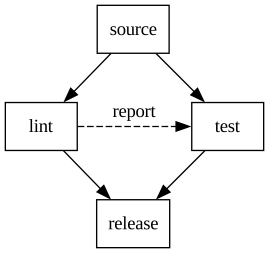
Lint and Test share a row between Source and Release. The dashed reporting edge is drawn without demanding another rank.
Align a column in a left-to-right graph
digraph Build {
  graph [rankdir=LR, ranksep=0.8];
  node [shape=box];
  source -> lint;
  source -> test;
  lint -> release;
  test -> release;
  { rank=same; lint; test; }
}
With left-to-right flow, Lint and Test now share a vertical column. The rank rule is unchanged; the overall graph direction determines its orientation.
What to watch for
A rank aligns centers rather than box edges. If labels have different lengths, their boxes can have different widths. rank=same also does not prescribe the order of nodes within the rank.
Use this with dot; switching to a force-directed engine changes the layout rules. If a secondary edge makes the hierarchy awkward, consider constraint=false for that edge only. Keep real dependencies as normal edges. For a larger example, see the decision-tree guide.
Related guides
- How to Draw Edges Between Graphviz Clusters
- How to Add Multiline Labels in Graphviz
- Graphviz cheatsheet
Reference: Official documentation.