How to create a Class diagram in PlantUML
1. Try it in the browser
You can render PlantUML diagrams instantly in your browser with the PlantUML Playground — no Java or server install required. The examples below can be pasted directly into it.
2. Define the diagram
To create a class diagram, declare each class with class Name { ... }, listing its attributes and methods inside the braces. Then connect classes with relationship arrows.
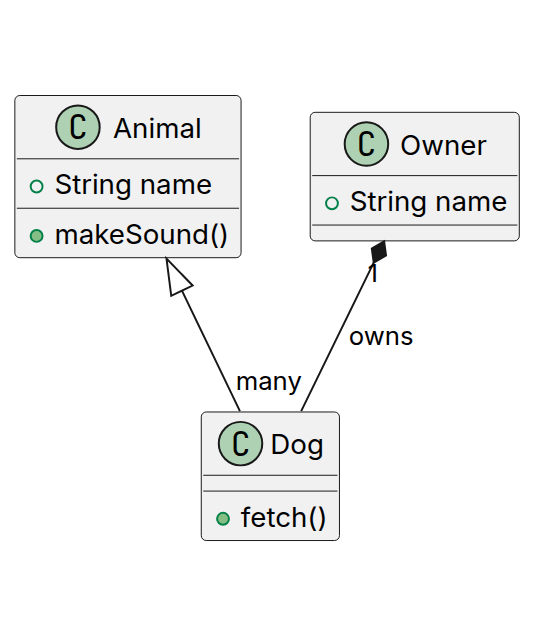
In this example, Dog inherits from Animal (empty triangle arrow), and one Owner owns many Dog instances via composition (filled diamond arrow).
3. Relationship types
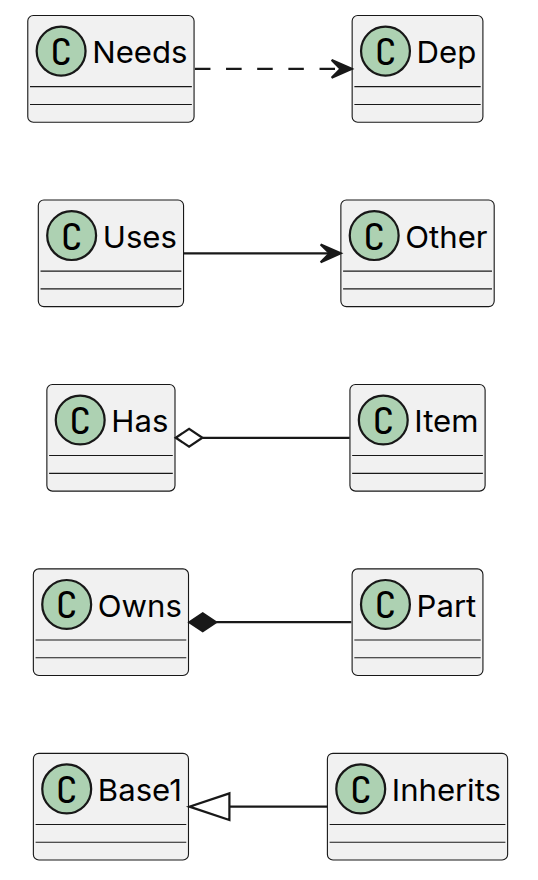
PlantUML class diagrams support the standard UML relationship arrows:
| Relationship | Syntax | Meaning |
|---|---|---|
| Inheritance | ClassA <|-- ClassB | ClassB is a subclass of ClassA (empty triangle arrowhead) |
| Composition | ClassA *-- ClassB | ClassB cannot exist without ClassA (owns, filled diamond) |
| Aggregation | ClassA o-- ClassB | ClassB can exist independently of ClassA (has-a, empty diamond) |
| Association | ClassA --> ClassB | ClassA uses or references ClassB (plain arrow) |
| Dependency | ClassA ..> ClassB | ClassA depends on ClassB (dashed arrow) |
4. Visibility modifiers, abstract classes, and interfaces
Prefix attributes/methods with + (public), - (private), or # (protected). Add multiplicity labels like "1" or "many" next to a relationship, and an optional : label to name it, as shown in the Owner "1" *-- "many" Dog : owns line above. Use abstract class Name for an abstract class, and interface Name for an interface — both render with an italicized name and a stereotype label.
5. Render the diagram
Once you have defined the diagram, you can render it on your webpage with the @plantuml/core browser engine (the same one that powers this site's live editor), or by sending the markup to a PlantUML rendering server that returns an SVG image, the same way as shown on the PlantUML sequence diagram page.
You can use this PlantUML Playground Link to explore that particular example.