How to create an Activity diagram in PlantUML
1. Try it in the browser
You can render PlantUML diagrams instantly in your browser with the PlantUML Playground — no Java or server install required. The examples below can be pasted directly into it.
2. Define the diagram
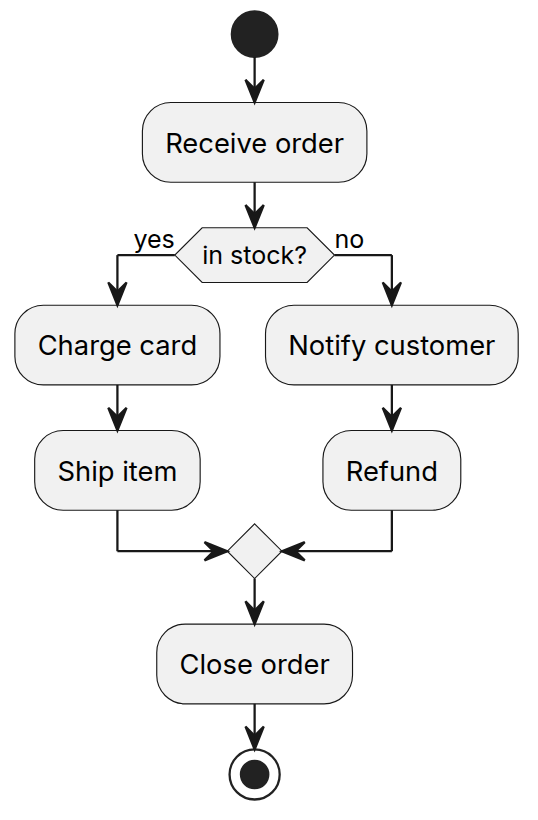
PlantUML's modern activity syntax starts with start, chains steps with :Action;, and ends with stop. Branch the flow with if () then (...) / else (...) / endif.
Here, an incoming order is checked for stock. The if/else block shows the two possible paths — charge and ship, or notify and refund — before both branches rejoin at Close order.
3. Loops and parallel forks
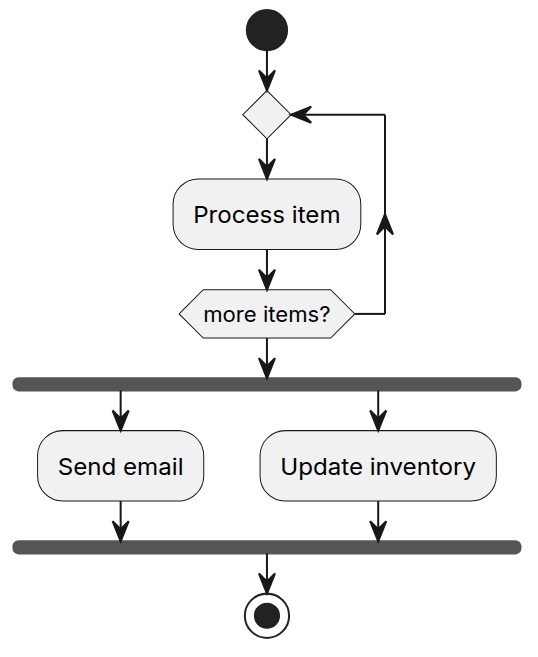
Use repeat / repeat while (...) for a loop, and fork / fork again / end fork to show steps that run in parallel and then join back together:
| Element | Syntax | Meaning |
|---|---|---|
| Condition | if (cond?) then (yes) ... else (no) ... endif | Branches the flow based on a condition, with labeled paths |
| Loop | repeat :step; repeat while (more?) | Repeats a step while a condition holds |
| Parallel fork | fork ... fork again ... end fork | Runs multiple branches concurrently, then joins them |
| Swimlane | |Lane name| | Groups subsequent steps under a named actor/lane column |
4. Swimlanes
Prefix a step with |Lane name| to move subsequent steps into that lane, useful for showing which actor or system owns each step in a multi-party process:
5. Render the diagram
Once you have defined the diagram, you can render it on your webpage with the @plantuml/core browser engine (the same one that powers this site's live editor), or by sending the markup to a PlantUML rendering server that returns an SVG image, the same way as shown on the PlantUML sequence diagram page.
You can use this PlantUML Playground Link to explore that particular example.