How to Make a Circular Hole Pattern in OpenSCAD
Make a circular bolt pattern by placing identical through-hole cutters at equal angles around a plate. A loop controls the hole count; the bolt-circle radius controls each center's distance from the origin.
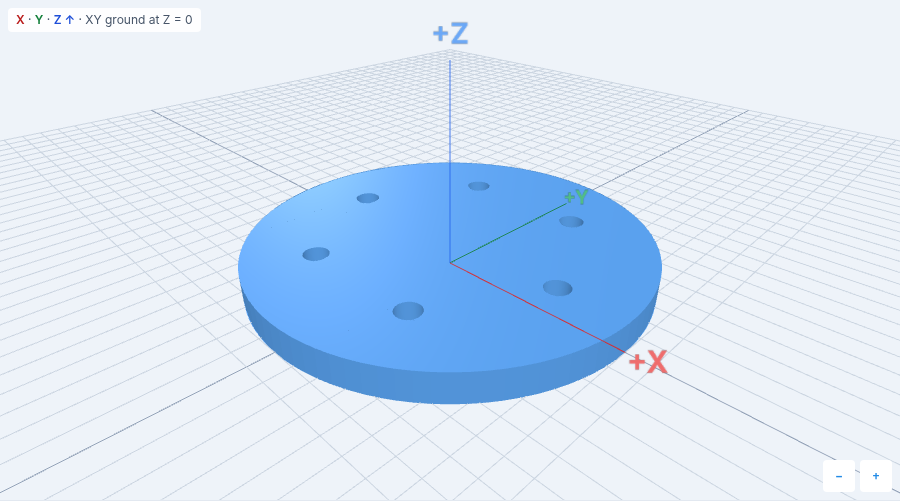
Cut six equally spaced holes
plate_diameter = 80;
plate_thickness = 6;
hole_count = 6;
bolt_radius = 26;
hole_diameter = 5;
eps = 0.1;
$fn = 96;

assert(hole_count >= 3 && hole_count == floor(hole_count));
assert(plate_thickness > 0 && hole_diameter > 0 && bolt_radius > 0);
assert(plate_diameter > 2*bolt_radius + hole_diameter + 4);
assert(2*bolt_radius*sin(180/hole_count) > hole_diameter);

difference() {
  cylinder(h=plate_thickness, d=plate_diameter);
  for (i = [0 : hole_count - 1])
    rotate([0, 0, i*360/hole_count])
      translate([bolt_radius, 0, -eps])
        cylinder(h=plate_thickness + 2*eps, d=hole_diameter);
}
Open the six-hole model in the playground
The plate is 80 units across and 6 units tall; these examples treat one unit as one millimeter. Six 5-unit holes have centers on a 26-unit-radius circle. The first cutter is centered at (26, 0). For each cutter, the inner translate moves it outward first; the outer rotate then swings it around the origin by i*360/hole_count degrees. Starting at zero and stopping at hole_count - 1 makes exactly six positions: including i = hole_count would put another cutter at 360 degrees, directly on top of the first. Both patterns were rendered with the playground's OpenSCAD 2025.01.19 WASM engine (Manifold 3.0.1).
Change the pattern without moving holes by hand
Try hole_count = 8, bolt_radius = 28, and hole_diameter = 4 in the same model. The resulting eight holes are 45 degrees apart, with centers 28 units from the origin. Open the eight-hole variation.
The rotate wraps the translate, so each center travels around the plate. Reversing them would rotate each axisymmetric cylinder in place and then translate every cutter to the same center, not create a circular pattern. The cutters start at -eps and end at plate_thickness + eps, crossing both faces rather than ending exactly on them. If you need a single hole or a blind hole instead, see how to cut holes with difference().
The first clearance assertion leaves more than 2 units of material between the outside of each hole and the plate rim. To find that rim clearance, subtract the bolt radius and half the hole diameter from half the plate diameter. The second assertion ensures neighboring holes do not intersect; their center spacing is 2*bolt_radius*sin(180/hole_count). Keep both checks when changing the count or dimensions. The plate's outer bounds stay at X/Y -40 to 40 and Z 0 to 6 for both patterns.
Related guides
- How to Cut Holes in OpenSCAD with difference()
- Interactive OpenSCAD tutorial: cut a bolt-hole circle
- Parametric mounting plate with four corner holes
- OpenSCAD cheatsheet
Reference: OpenSCAD manual: for loops and transformations.