How to Cut Holes in OpenSCAD with difference()
Put the part first inside difference(), followed by the solid you want to subtract. For a through-hole, extend the cutter slightly beyond both faces of the part.
Cut a centered through-hole
plate_width = 50;
plate_depth = 30;
plate_thickness = 6;
hole_diameter = 8;
eps = 0.1;

difference() {
  cube([plate_width, plate_depth, plate_thickness]);
  translate([plate_width/2, plate_depth/2, -eps])
    cylinder(h=plate_thickness + 2*eps, d=hole_diameter, $fn=64);
}
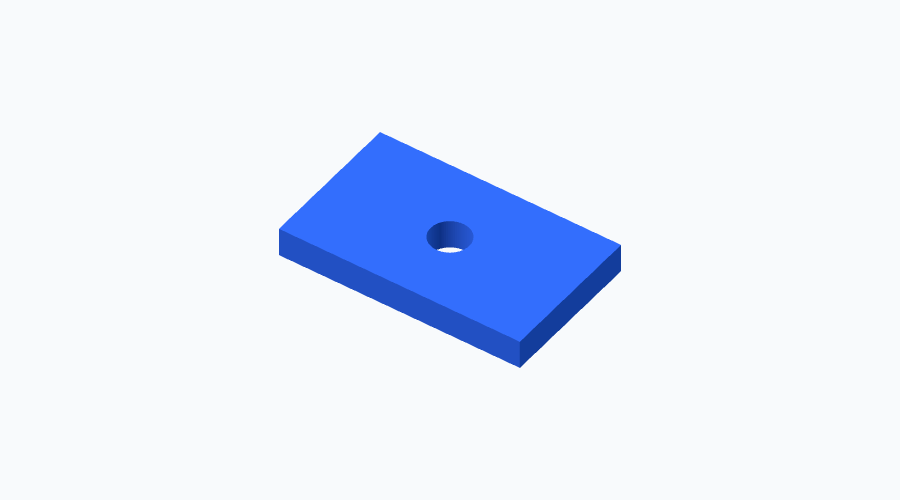
The result is a 50 × 30 × 6 plate with a centered 8-unit through-hole. The cutter starts below the bottom and ends above the top. These examples treat one coordinate unit as one millimeter.
Cut a blind hole from the top
plate_thickness = 8;
hole_depth = 5;
eps = 0.1;
assert(hole_depth > 0 && hole_depth < plate_thickness);

difference() {
  cube([40, 30, plate_thickness]);
  translate([20, 15, plate_thickness - hole_depth])
    cylinder(h=hole_depth + eps, d=10, $fn=64);
}
This hole leaves a 3-unit floor. Increase hole_depth to make it deeper; the assertion prevents accidentally turning this example into a through-hole.
What to watch for
If the hole does not appear, first check whether the cylinder actually overlaps the part. A cylinder is vertical along Z unless rotated. Also check the order: subtracting the block from the cylinder produces a different model.
Avoid a cutter that ends exactly on the surface. A little overlap makes the intended cut unambiguous. Keep the part and cutter as separate children of difference(); do not wrap both inside one union.
Try it: change the hole diameter to 12 and inspect the remaining wall. For a multi-hole model, open the parametric mounting plate.
Related guides
- How to Make a Plate with Rounded Corners in OpenSCAD
- How to Make Cylinders and Circles Smoother in OpenSCAD
- OpenSCAD cheatsheet
Reference: OpenSCAD manual.