Debugging Broken Diagram Code: 17 Mermaid, Graphviz and PlantUML Failures
The question
Diagram code often arrives from somewhere else: a chat assistant, a README, an old wiki page. When it fails, the error message is the first clue. So we asked:
What do common diagram-code mistakes actually look like in Mermaid, Graphviz, and PlantUML, does the error point at the real mistake, and which mistakes give no error at all?
What we tested (and what we didn't)
We wrote 17 deliberately broken diagrams by hand. Each one copies a kind of mistake that shows up when diagram code is generated or pasted, such as a leftover Markdown fence or syntax from the wrong tool. None of them are AI output, so this article says nothing about how often any model makes these mistakes. It only shows what each engine does when it meets them.
Every example has a fixed version. We opened both versions in this site's playgrounds and copied the messages exactly as the page showed them:
| Tool | Engine in the playground | Version |
|---|---|---|
| Mermaid | mermaid npm package | 10.9.0 |
| Graphviz | @viz-js/viz (WebAssembly) | 3.2.3, which reports Graphviz 9.0.0 |
| PlantUML | @plantuml/core (in-browser, no Java or server) | 1.2026.6 |
All 17 broken and fixed pairs are in cases.json. Every example below has links that open it in the matching playground.
Results at a glance
| # | Mistake | Tool | What the engine reported | Points at the mistake? |
|---|---|---|---|---|
| 1 | Markdown fence copied with the code | Mermaid | No diagram type detected… | Indirectly: no line number |
| 2 | Explanation text above the graph | Graphviz | syntax error in line 2 near 'digraph' | One line late |
| 3 | Markdown fence copied with the code | PlantUML | Diagram not supported by this release of PlantUML… | No: blames the diagram type |
| 4 | Shape syntax from a newer Mermaid | Mermaid | Lexical error on line 2. Unrecognized text. | Yes, with a caret at @{ |
| 5 | Graphviz arrow -> in Mermaid | Mermaid | Parse error on line 2 … got 'MINUS' | Yes |
| 6 | -> inside an undirected graph | Graphviz | syntax error in line 2 near '->' | Yes, at the edge (fix is on line 1) |
| 7 | Mermaid flowchart LR header in PlantUML | PlantUML | Syntax Error? (Assumed diagram type: sequence) (line 2) | Line yes, but the guessed type misleads |
| 8 | Unescaped " inside a label | Graphviz | syntax error in line 2 near '"' | Yes |
| 9 | Hyphen in an unquoted node ID | Graphviz | syntax error in line 2 near '-' | Yes |
| 10 | Parentheses in an unquoted label | Mermaid | Parse error on line 2 … got 'PS' | Yes |
| 11 | Hyphen in an alias | PlantUML | Syntax Error? (Assumed diagram type: activity) (line 4) | At the use, not the alias on line 2 |
| 12 | Subgraph without end | Mermaid | Parse error on line 5 | No: points at the end of the input, not line 2 |
| 13 | Missing closing } | Graphviz | syntax error in line 6 | No: last line, not line 2 |
| 14 | Package without closing } | PlantUML | No error | Renders the wrong grouping |
| 15 | ID typo (DB vs db) | Mermaid | No error | Adds a second node |
| 16 | subgraph backend without cluster_ | Graphviz | No error | The group box disappears |
| 17 | ID typo (Db vs db) | PlantUML | No error | Adds a stray circle element |
In this set, 7 of the 17 examples gave a line number that matched the mistake, though in two of them (#6 and #7) the fix or the message's explanation lies elsewhere. Four pointed at a different line, two gave no usable line number, and four rendered a wrong diagram with no warning. These counts describe our 17 hand-picked examples only. They are not a failure rate.
1. Text that isn't diagram code
One copy-and-paste problem is extra text around the diagram.
Mermaid with a Markdown fence:
```mermaid
flowchart LR
  web[Web app] --> api[API]
  api --> db[(Orders DB)]
```
The playground showed:
No diagram type detected matching given configuration for text: ```mermaid
flowchart LR
  web[Web app] --> api[API]
  api --> db[(Orders DB)]
```
Its summary line: Start with a diagram type, such as flowchart TD or sequenceDiagram.
The engine's message includes the whole input, so you can see the backticks in it. The fix is to delete the fence lines. Open broken · Open fixed
Graphviz with a leftover sentence:
Here is the diagram:
digraph G {
  web -> api -> db;
}
The playground showed:
syntax error in line 2 near 'digraph'
Its summary line: Check line 2 for a missing label, bracket, brace, or connection.
The real mistake is line 1. Graphviz reads Here is the diagram: as the start of a statement and only fails when it reaches digraph on line 2. When a Graphviz error says near 'digraph' or near 'graph', look above that line. Open broken · Open fixed
PlantUML with a Markdown fence:
```plantuml
@startuml
rectangle Web
rectangle API
Web --> API
@enduml
```
The playground showed:
Diagram not supported by this release of PlantUML. Check the diagram directive and use a diagram type supported by this browser engine.
This message is the most misleading one in the set. The diagram type is fine; the fence line in front of @startuml is the problem. Open broken · Open fixed
2. Syntax from another tool or version
Mermaid shape syntax from a newer release. The @{ shape: … } form was added in a later Mermaid version than the 10.9.0 engine here.
flowchart LR
  api[API] --> db@{ shape: cyl, label: "Orders DB" }
The playground showed:
Lexical error on line 2. Unrecognized text.
...LR  api[API] --> db@{ shape: cyl, label
----------------------^
In 10.9.0, use the bracket shapes instead: db[(Orders DB)] draws a cylinder. If a diagram works in another editor but not here, check which Mermaid version each one runs. Open broken · Open fixed
A Graphviz arrow in Mermaid. Mermaid links need two dashes: -->.
flowchart LR
  web -> api
The playground showed:
Parse error on line 2:
flowchart LR  web -> api
------------------^
Expecting 'SEMI', 'NEWLINE', 'EOF', 'AMP', 'START_LINK', 'LINK', got 'MINUS'
Its summary line: Check line 2 for an incomplete label, bracket, quote, or connection.
A directed edge in an undirected Graphviz graph. graph only allows --; digraph only allows ->.
graph G {
  web -> api;
}
The playground showed:
syntax error in line 2 near '->'
Its summary line: Check line 2 for a missing label, bracket, brace, or connection.
The error points at the edge, but the right fix is usually the header on line 1: change graph to digraph if you want arrows. Open broken · Open fixed
A Mermaid header inside PlantUML:
@startuml
flowchart LR
rectangle Web
rectangle API
Web --> API
@enduml
The playground showed:
Syntax Error? (Assumed diagram type: sequence) (line 2)
PlantUML guesses the diagram type from the content. Here it guessed sequence, which has nothing to do with the mistake. The line number is right, though: delete flowchart LR, and use left to right direction if you wanted that layout. Open broken · Open fixed
3. Characters inside labels and IDs
An unescaped quote in a Graphviz label:
digraph G {
  api [label="The "fast" path"];
}
The playground showed:
syntax error in line 2 near '"'
Its summary line: Check line 2 for a missing label, bracket, brace, or connection.
Escape the inner quotes as \". Open broken · Open fixed
A hyphen in a Graphviz ID. An unquoted ID can contain only letters, digits and underscores, and can't start with a digit (a plain number is also allowed).
digraph G {
  order-service -> db;
}
The playground showed:
syntax error in line 2 near '-'
Its summary line: Check line 2 for a missing label, bracket, brace, or connection.
Quote the ID ("order-service") or use an underscore. Open broken · Open fixed
Parentheses in a Mermaid label:
flowchart LR
  up[Upload (CSV)] --> api[API]
The playground showed:
Parse error on line 2:
...hart LR  up[Upload (CSV)] --> api[API]
----------------------^
Expecting 'SQE', 'DOUBLECIRCLEEND', 'PE', … got 'PS'
Its summary line: Check line 2 for an incomplete label, bracket, quote, or connection.
PS is Mermaid's name for an opening parenthesis. Quote the label: up["Upload (CSV)"]. Our Mermaid special characters guide covers quotes, #quot; and the reserved word end. Open broken · Open fixed
A hyphen in a PlantUML alias:
@startuml
rectangle "Order service" as order-service
rectangle "Orders DB" as db
order-service --> db
@enduml
The playground showed:
Syntax Error? (Assumed diagram type: activity) (line 4)
The alias on line 2 is accepted, so the error appears on line 4 where the alias is used in an arrow. Rename it to order_service in both places. Open broken · Open fixed
4. Blocks that are never closed
For an unclosed block, both Mermaid and Graphviz report the error at the end of the input, not at the line that opened the block.
Mermaid subgraph without end:
flowchart LR
  subgraph backend[Backend]
    api[API]
  web[Web app] --> api
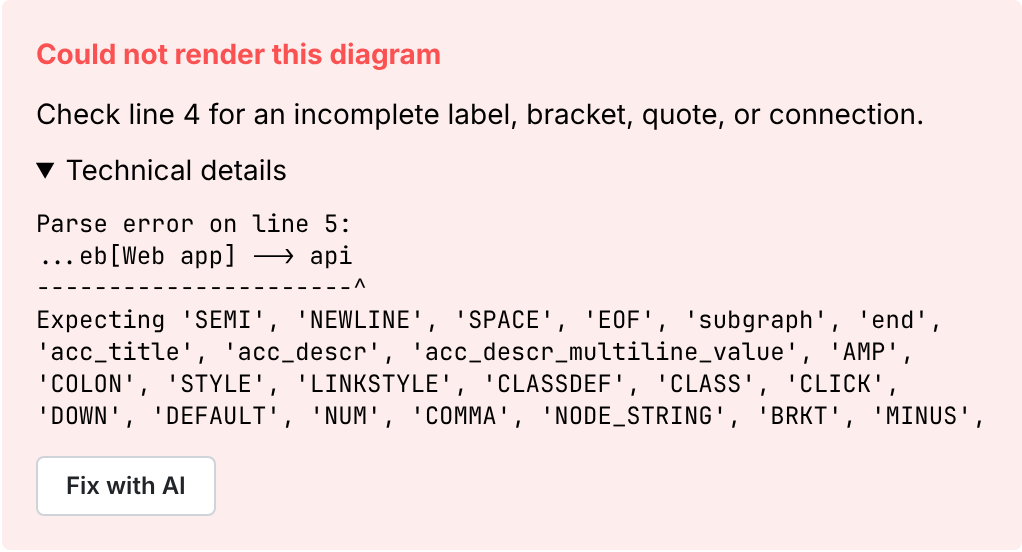
The input has four lines. The playground's summary says line 4, and Mermaid's own message says line 5. Neither points at line 2, where subgraph opens. When a Mermaid error points at the end of the input and the expected-token list includes 'end', look for an unclosed subgraph. Open broken · Open fixed
Graphviz cluster without }:
digraph G {
  subgraph cluster_backend {
    label="Backend";
    api;
  web -> api;
}
The playground showed:
syntax error in line 6
Its summary line: Check line 6 for a missing label, bracket, brace, or connection.
Line 6 is the final }. Graphviz uses it to close the cluster, then runs out of input before the graph is closed. Open broken · Open fixed
PlantUML package without }:
@startuml
package "Backend" {
  rectangle API
rectangle Web
Web --> API
@enduml
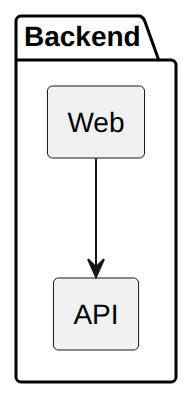
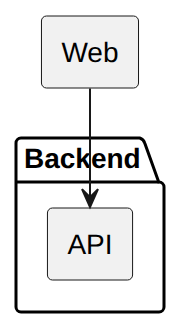
PlantUML reported no error. It closed the package at @enduml, so Web ended up inside Backend:
5. Diagrams that render, but wrong
These are the hardest to spot, because the preview looks normal.
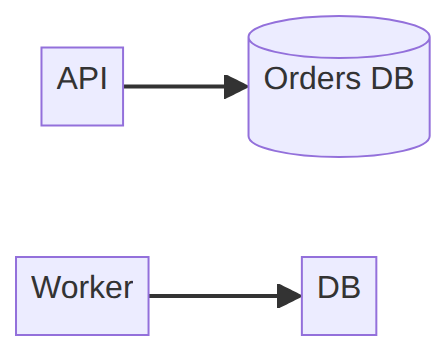
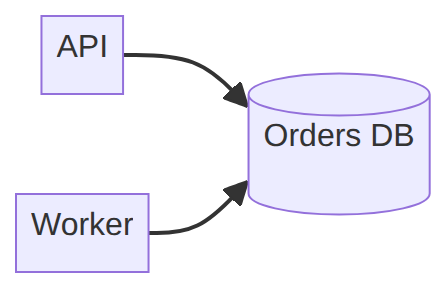
Mermaid ID typo. IDs are case-sensitive, so DB creates a new node instead of linking to db:
flowchart LR
  api[API] --> db[(Orders DB)]
  worker[Worker] --> DB
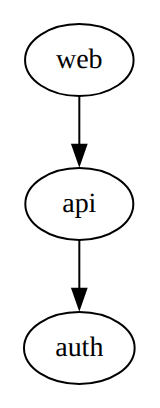
Graphviz subgraph without the cluster_ prefix. Graphviz draws a box only around subgraphs whose names start with cluster. Without it, the label is ignored and the nodes are drawn loose:
digraph G {
  subgraph backend {
    label="Backend";
    api; auth;
  }
  web -> api -> auth;
}
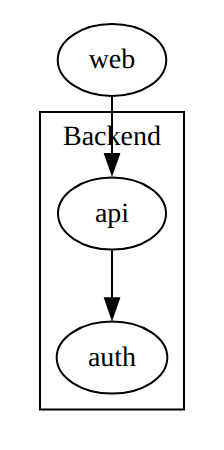
See connecting Graphviz clusters for more about clusters. Open broken · Open fixed
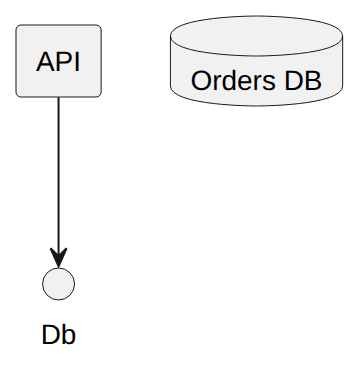
PlantUML ID typo. Db isn't the declared alias db, so PlantUML creates a new element. Here it's drawn as a small circle, not the database:
@startuml
rectangle API as api
database "Orders DB" as db
api --> Db
@enduml
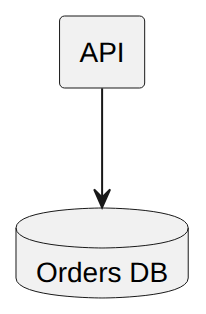
A debugging checklist from these results
- Check the first and last lines. Remove Markdown fences and any explanation text. Make sure the first line is the diagram header (
flowchart …,digraph …,@startuml). - Check that the code matches the tool and version.
->belongs to Graphviz,-->to Mermaid and PlantUML. Newer Mermaid syntax such as@{ … }fails in older engines. - If the error points at the last line, count your blocks. Every
subgraphneeds anend, and every{needs a}. PlantUML may not report a missing}at all. - If the error points at a character, quote the text. This applies to
(,"and-in labels and IDs. - Even when it renders, count the boxes. An extra node usually means an ID typo or a case difference. A missing group box in Graphviz usually means a missing
cluster_prefix.
Method and limitations
- Hand-made examples. We wrote all 17 examples by hand to reproduce common kinds of mistakes. We didn't sample any AI tool, so this tells you nothing about how often those mistakes happen.
- One engine version each. We ran Mermaid 10.9.0, Graphviz 9.0.0 (viz-js 3.2.3) and the in-browser PlantUML 1.2026.6, in Chromium through this site's playgrounds. Other versions, the Graphviz
dotcommand line, or PlantUML's Java build may word errors differently or accept different input. - Two kinds of message. The playground shows its own short summary above the engine's technical details, and quotes in this article come from one or the other. For example, the Mermaid summary said line 4 while the engine said line 5.
- One mistake per example. Real broken diagrams often contain several mistakes at once, and the first error can hide the rest.
Try it yourself
- Paste your diagram into the Mermaid playground, the Graphviz playground, or the PlantUML playground.
- Syntax references: Mermaid cheatsheet, Graphviz cheatsheet, PlantUML cheatsheet.
- To compare the three tools on a working diagram, see One architecture, three diagram tools.