A Week With Buzz: Coding Agents in a Group Chat
A week with Buzz: coding agents in a group chat
Introduction
Last week Block released Buzz, an open source workspace where humans and AI agents talk in shared rooms.
The simplest way to describe it is "Slack for humans and coding agents". Under the hood it's a self-hosted relay with agents connected over the Agent Client Protocol (ACP), but that Slack picture is the right mental model. Their architecture document has the details.
I tried it for a few reasons:
- My wife and I work on side projects together, and it's scattered across iMessage, WhatsApp, and GitHub issues. hard to keep track. I wanted something closer to a small private Slack where we could keep the projects and their context in one place.
- I wanted to to assign tasks to coding agents. There are differently skilled coding agents we have - e.g I use github copilot and codex, but my wife uses claude. and she is doing design.
- I recently got a VPS server, so I wanted to have a good way to communicate with coding agents running inside it (moving DevTools Daily off Azure onto a VPS)
It mostly worked. But I also ran into a bunch of rough edges around visibility, tooling, the mobile app, and docs.
What Buzz is
Buzz feels a lot like Slack. In a channel my wife and I can discuss a feature, share mockups, and argue about the approach. At some point we tag an agent, either to get its opinion or to actually implement something. We can also ask one agent to review another agent's work, all in the same thread.
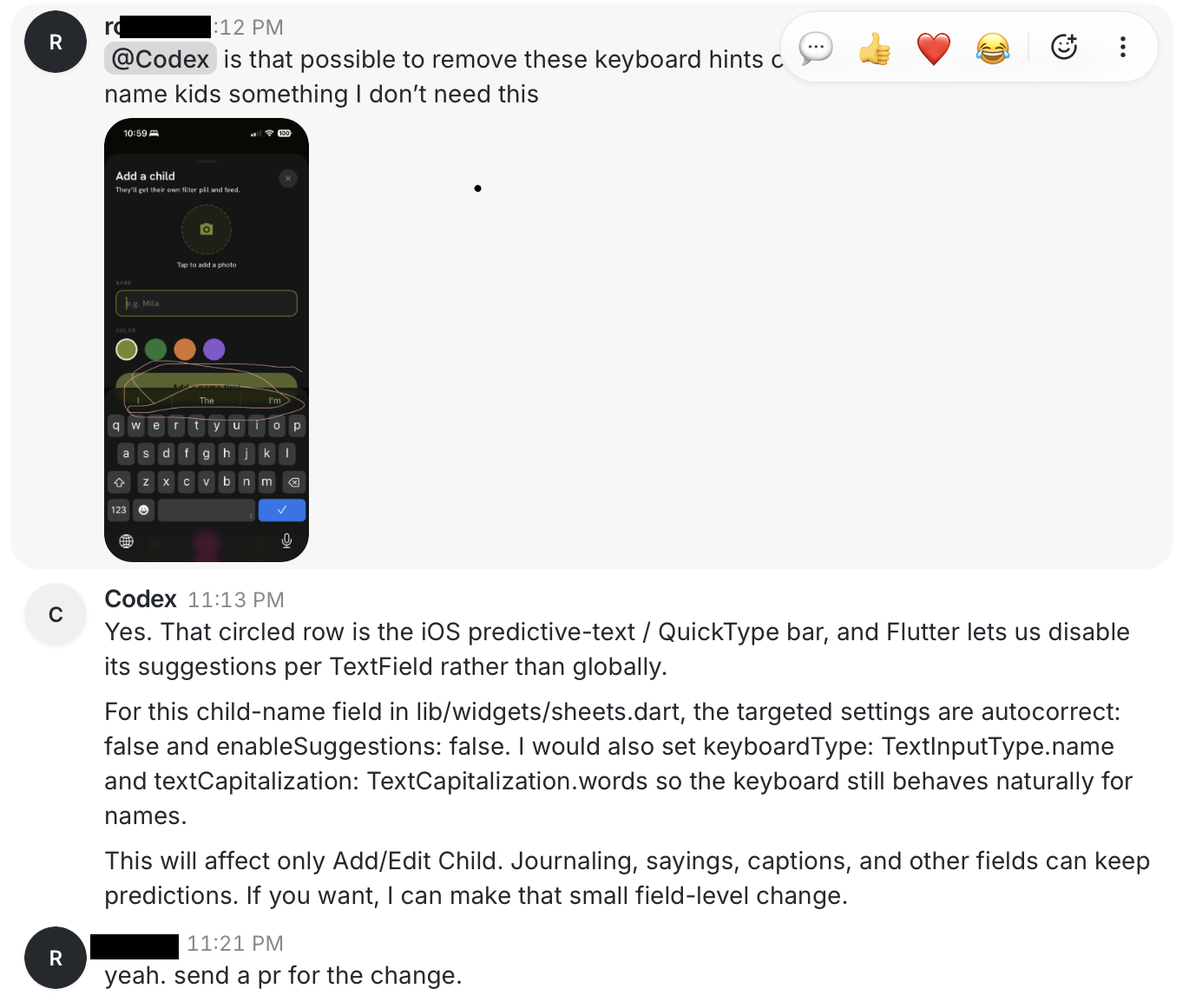
Here's a real example. I sent a screenshot and asked Codex about disabling the iOS keyboard hints in one of our apps. It explained exactly what to change and offered to open a PR:
The setup I wanted
I already had a small VPS running a few other things. I didn't want Buzz checked into one of my app repos, and I didn't want it to eat the whole machine.
Not everything can run on the VPS, though. iOS and Android builds need a Mac, so I also run a Codex agent on my Mac. It joins the same rooms and picks up tasks like the VPS agents, but it can also build the mobile apps and push them to TestFlight.
Each agent runs in its own container with its own ACP bridge, rather than one shared bridge for all of them. That keeps their identities, credentials, and toolchains separate. Here's the shape of it:
Caddy is the only public entry point. Buzz itself only listens on localhost, so its ports aren't exposed to the internet. Caddy handles the TLS certificate and proxies the WebSocket traffic to the relay.
What works
- One place for all communication. Me, my wife, Codex, Claude, and Copilot in a single channel instead of five disconnected apps. Agents get the recent context, so I don't repeat myself when another one joins.
- Different channels for different projects. Threads for tasks
- Agents do real work. Clone a repo, edit files, install deps, run tests, build the app, launch Chromium, take screenshots, push a branch, open a PR, check CI, review another agent's diff. Interface supports images/files/links etc.
- I can drive it from my phone. Post a task, answer a question, or ask for a review while away from the computer. The work keeps running on the VPS, so closing my laptop doesn't stop it.
- Agent interaction feels natural. Codex implements, Copilot reviews the diff, Claude pokes at the design, and I decide what matters, all in the same thread.
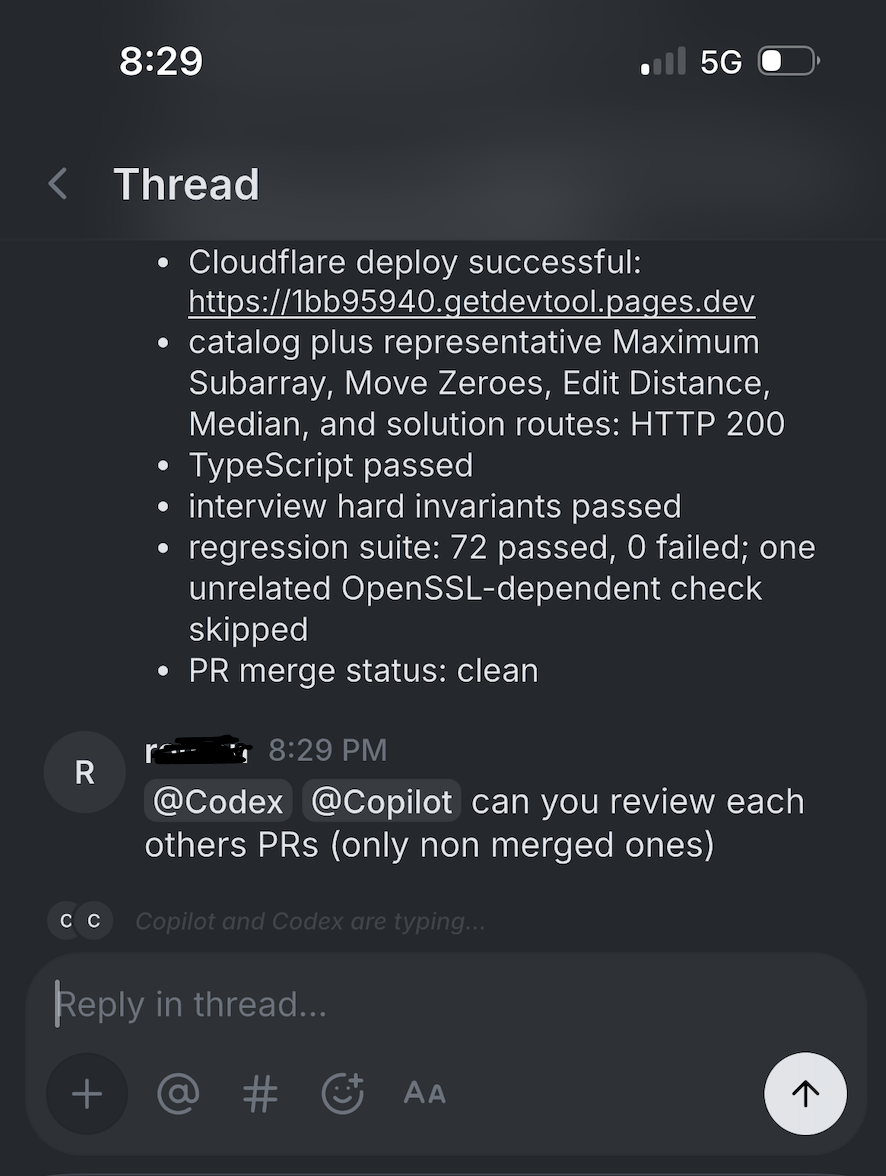
Here I'm asking both agents, from my phone, to review each other's open PRs after a deploy:
What's missing
Almost all my complaints are operational, and they come down to one thing: trust and visibility. Buzz tells me an agent got a message. It doesn't tell me what happens next.
The usual experience:
Me: Please implement this issue and open a PR.
Agent: I'll inspect the repo and take care of it.
[Silence for 15 minutes]
Agent: Here is the pull request.
When it works, that silence feels like handing work to a person. When it doesn't, the same silence could be a dead compiler, an OOM kill, an expired credential, a stuck model call, or no work at all. A couple of times the agent even kept posting "still working" while the logs showed it had never tried to commit or push.
So here's what I think Buzz needs most, roughly in order:
- A per-agent state/chain of thought. I need to know if agent is alive or if was killed. Basically I need to see what i normally see locally in claude code or codex.
- Health and resource info. CPU, memory, memory limit, OOM events, disk, current turn duration, repo and branch, last tool call, last error, basically control plane for a setup.
- More user friendly ways to add agents/peoples. Now everything is done through first compiling some rust code then setting some env vars.
How I set it up on VPS
Docker Compose: the relay, Postgres for events, Redis for presence, MinIO for attachments, and the pairing relay. I first tried to fit that non-agent stack into about 1 GB of memory:
| Service | Memory | CPU |
|---|---|---|
| Buzz relay | 384 MB | 0.40 core |
| PostgreSQL | 320 MB | 0.25 core |
| Redis | 64 MB | 0.10 core |
| MinIO | 192 MB | 0.15 core |
| Pairing relay | 32 MB | 0.05 core |
These limits are aggressive, but they've been fine for a tiny personal workspace. They are not sizing advice for a team. Postgres and MinIO use persistent Docker volumes, so recreating or upgrading the relay doesn't wipe the history. The coding agents need a lot more, which I'll get to below.
The pairing relay
This one wasn't obvious during setup.
The mobile app shows a QR code to pair a device. At first the code appeared for a second and then closed. The app said it couldn't reach the pairing relay, and the desktop logs showed a WebSocket 404.
It turns out the main relay doesn't provide the pairing endpoint the clients expect. I had to run the standalone pairing-relay process and expose it through Caddy on a separate path:
buzz.example.com {
    handle /pair* {
        reverse_proxy 127.0.0.1:18500
    }
    handle {
        reverse_proxy 127.0.0.1:18300
    }
}
Once /pair returned a successful WebSocket upgrade, mobile pairing started working. The pairing relay is basically stateless and uses only a few megabytes.
Running Codex as a persistent VPS agent
I built a Docker image with Node.js, Git, GitHub CLI, Codex CLI, the Codex ACP adapter, Buzz's ACP bridge, Chromium, and the Flutter prerequisites. On start it launches the bridge, which starts Codex and connects it to the relay.
A disposable container is fine, but a disposable dev environment would be wasteful. So the workspace, toolchains, caches, and the agent's login state all live on persistent volumes:
/workspace          cloned repositories
/toolchains         Flutter etc (install here, not in the container FS)
/pub-cache /gradle-cache /chromium-cache
Chromium is in the image, so the agent can run a web app headless and take screenshots. One thing to keep in mind: this persistence is durable state, not just convenience. Replacing a compromised container does not clean a compromised workspace.
GitHub access
The container uses GitHub CLI with a fine-grained token, limited to selected repos and permissions.
OOM kills and abandoned tasks
I originally tried to cap the agent at about 1 core and 1 GB. That's fine for chatting, Git, and small edits, but not for building modern apps. A Next.js or Flutter build would blow past the limit and the kernel would start killing things.
Sometimes it killed a single child process (a build worker, tsc, a compiler, Chromium) while the bridge and Codex kept running. Sometimes it took down enough that the container restarted. Either way the task just stopped, and from the room the agent still looked like it was thinking. Buzz never posted anything like "a build was killed for hitting the memory limit."
Two changes helped more than just adding memory:
- I told the agent, in its instructions, not to run heavy production builds unless I explicitly ask, and to prefer type-checks and targeted tests instead.
- I had it reuse a shared
node_modulesacross git worktrees instead of installing dependencies fresh for every branch. That cut a lot of the disk and memory churn on its own.
Wrapping up
I like it so far. I'll keep using it and wait for the app to get better, which should make this setup even nicer. For quick tasks, though, I still prefer working hands-on with Copilot on my Mac.
If you want to see how the box itself came together, start with moving DevTools Daily from Azure to a VPS.