What JSON Loses in CSV and Type Generation: One Fixture, Eight Tools
The question
When you convert JSON to CSV and back, or generate types from a JSON sample, which values come out different, and how would you notice?
People often say "CSV loses types" and leave it there. But different converters lose different things, and the details matter: is null still null? Does a missing field come back as an empty string? Does an ID above 253 keep its last digit?
To find out, we wrote one small fixture with the values that usually cause trouble and ran it through eight of this site's tools in a real browser. We pasted the input, downloaded each output and compared it with the original using a script. This article reports what these tools did with that fixture. Other converters, libraries and spreadsheets may behave differently.
The fixture
Five product records. Each field is there to test one kind of value:
| Field | What it tests |
|---|---|
id | Normal integers, plus 9007199254740993 in record 3. That is 253 + 1, the first integer a JavaScript number can't store exactly. |
sku | Strings that look like numbers: "00123", "04500", "000", "123", "00123-B" |
name | A comma, double quotes and a newline in one string |
price, rate | 5.0 written with a trailing zero, and 0.1234567890123456789 with 19 decimal places |
active | Booleans |
discount, note | null in some records, missing in record 3, 0, "", and the string "true" |
tags | An array, an empty array [], null, and missing |
dims | A nested object, an object with a null inside, and null |
variants | An array of objects, an empty array, and one object with an extra backorder key |
contact | Only in record 1: "+1 555 0100" |
[
  {
    "id": 1001,
    "sku": "00123",
    "name": "Widget, \"Pro\"\nedition",
    "price": 19.99,
    "rate": 0.1234567890123456789,
    "active": true,
    "discount": null,
    "note": "",
    "tags": ["new", "sale"],
    "dims": { "w": 10, "h": 2.5 },
    "variants": [{ "color": "red", "stock": 3 }],
    "contact": "+1 555 0100"
  },
  {
    "id": 1002,
    "sku": "04500",
    "name": "Gadget",
    "price": 5.0,
    "rate": 1.5,
    "active": false,
    "discount": 0.15,
    "note": null,
    "tags": [],
    "dims": { "w": 3, "h": null },
    "variants": []
  },
  {
    "id": 9007199254740993,
    "sku": "123",
    "name": "Big-ID part",
    "price": 0,
    "rate": 2,
    "active": true,
    "tags": ["x"],
    "dims": null,
    "variants": [{ "color": "blue", "stock": 0, "backorder": true }]
  },
  {
    "id": 1004,
    "sku": "000",
    "name": "Cable",
    "price": 7.25,
    "rate": 0.5,
    "active": true,
    "discount": null,
    "note": "fragile",
    "tags": null,
    "dims": { "w": 1, "h": 1 },
    "variants": [{ "color": "green", "stock": 12 }, { "color": "black", "stock": 4 }]
  },
  {
    "id": 1005,
    "sku": "00123-B",
    "name": "Spare",
    "price": 3.5,
    "rate": 0.25,
    "active": false,
    "discount": 0,
    "note": "true",
    "dims": { "w": 2, "h": 2 },
    "variants": [{ "color": "red", "stock": 1 }]
  }
]
How we ran it
- Date: 10 November 2026.
- Browser: headless Chromium 145.0.7632.6 at 1440×1000, driven by Playwright. The script used each page the way a person would. It pasted text into the editor, set the options, and saved the result with the page's own Download button (or read the output editor if the page had no download).
- Site: a local development build of the site's
stagingbranch. The converters run entirely in the browser, so the build type shouldn't change their output. We didn't repeat the run on the production site. - Tools, in order: JSON to CSV, CSV to JSON, CSV ⇄ JSONL in both directions, JSON to JSONL, JSON to TypeScript, JSON to Zod, JSON to JSON Schema and the JSON Schema Validator. Every option was left at its default.
- Comparison: a Node.js script parsed the fixture and each output with lossless-json, so numbers were compared as their exact source text, and listed every value whose type or text changed.
Step 1: JSON to CSV
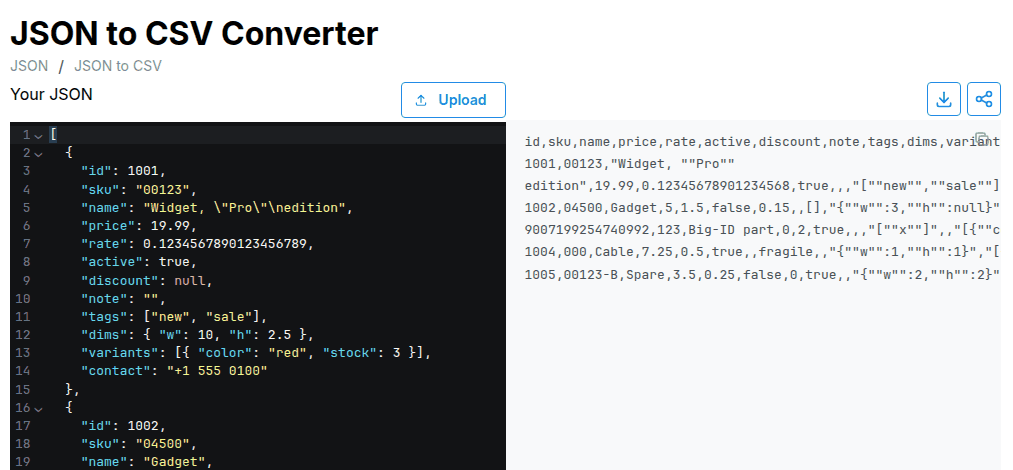
The JSON to CSV Converter produced:
id,sku,name,price,rate,active,discount,note,tags,dims,variants,contact
1001,00123,"Widget, ""Pro""
edition",19.99,0.12345678901234568,true,,,"[""new"",""sale""]","{""w"":10,""h"":2.5}","[{""color"":""red"",""stock"":3}]",'+1 555 0100
1002,04500,Gadget,5,1.5,false,0.15,,[],"{""w"":3,""h"":null}",[],
9007199254740992,123,Big-ID part,0,2,true,,,"[""x""]",,"[{""color"":""blue"",""stock"":0,""backorder"":true}]",
1004,000,Cable,7.25,0.5,true,,fragile,,"{""w"":1,""h"":1}","[{""color"":""green"",""stock"":12},{""color"":""black"",""stock"":4}]",
1005,00123-B,Spare,3.5,0.25,false,0,true,,"{""w"":2,""h"":2}","[{""color"":""red"",""stock"":1}]",
What changed before the data even reached CSV:
- The big ID changed.
9007199254740993became9007199254740992. The cell is wrong, and nothing on the page says so. - The long decimal was rounded.
0.1234567890123456789became0.12345678901234568. 5.0became5. The value is the same; only the text changed.
These three come from the page reading the input with JavaScript's JSON.parse, which turns every number into a 64-bit float. Step 4 shows that the CSV format itself isn't the cause.
What the CSV can't represent:
null, a missing key and""all become an empty cell. Look atdiscount:nullin record 1, missing in record 3, and both cells are empty. Same fornote:""in record 1,nullin record 2.- Nested values are stored as JSON text inside a cell.
dimsandvariantsare still readable, and thenullinside record 2'sdimssurvives as text, but a CSV reader sees one string per cell. - An empty array is not lost.
[]is written as[], so it stays different fromnull(empty cell).
What survived:
- The name with a comma, quotes and newline was quoted correctly.
"00123","04500"and"000"were written with their leading zeros.- Booleans became
trueandfalse.
One change is deliberate: +1 555 0100 became '+1 555 0100. The converter adds a ' before any text that starts with =, +, - or @, so a spreadsheet won't run it as a formula. That protects against CSV formula injection, but the ' is now part of the data.
Step 2: CSV back to JSON
We pasted that CSV into CSV to JSON. Every value came back as a string:
{
  "id": "9007199254740992",
  "sku": "123",
  "price": "0",
  "active": "true",
  "discount": "",
  "note": "",
  "tags": "[\"x\"]",
  "dims": "",
  "variants": "[{\"color\":\"blue\",\"stock\":0,\"backorder\":true}]",
  "contact": ""
}
That's record 3, with name and rate left out. Compared with the original fixture, 47 of the values had changed:
- Numbers and booleans became strings:
1001→"1001",true→"true". nulland missing keys both became"". Record 3 now hasdiscount,noteandcontactkeys it never had.- Arrays and objects became strings of JSON.
- The changes from step 1 (the ID, the rate, the
'prefix) are still there.
The leading zeros, "123" and "true" are fine here, because nothing was converted.
Step 3: CSV to JSONL with type inference
The CSV ⇄ JSONL converter has an Infer numbers, booleans & null option, which is on by default. We pasted the same CSV.
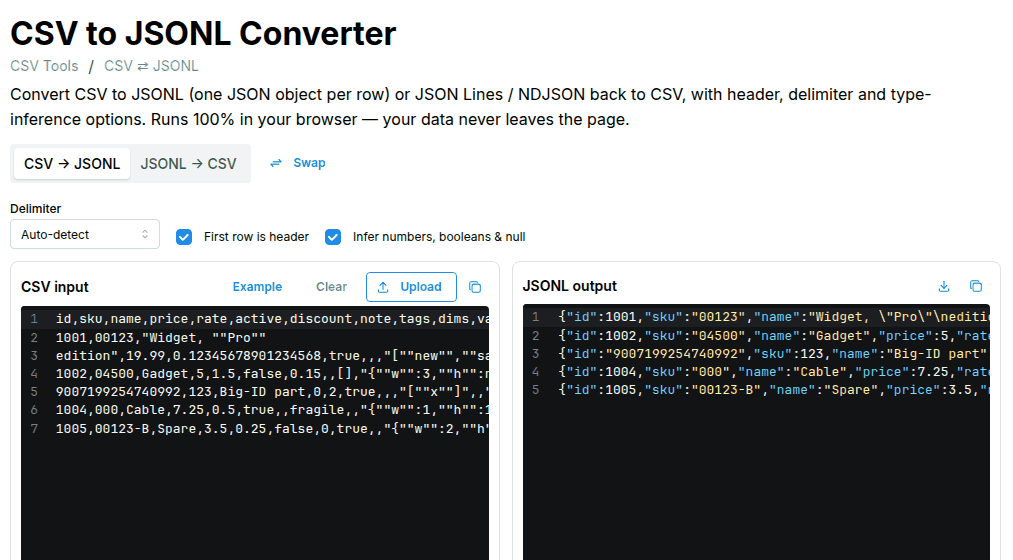
Inference fixed most of step 2. Numbers and booleans were numbers and booleans again, and the leading-zero SKUs stayed strings. 30 values were still different from the original:
{"id":"9007199254740992","sku":123,"name":"Big-ID part","price":0,"rate":2,"active":true,"discount":"","note":"","tags":"[\"x\"]","dims":"","variants":"[{\"color\":\"blue\",\"stock\":0,\"backorder\":true}]","contact":""}
{"id":1005,"sku":"00123-B","name":"Spare","price":3.5,"rate":0.25,"active":false,"discount":0,"note":true,"tags":"","dims":"{\"w\":2,\"h\":2}","variants":"[{\"color\":\"red\",\"stock\":1}]","contact":""}
- The big ID became a string. The tool won't turn
9007199254740992into a number because it's above the safe integer limit. That stops further damage, but the ID's type is now different from the other records, and its digits were already wrong in step 1. - Two strings changed type.
"sku": "123"became the number123, and"note": "true"became the booleantrue."00123","04500"and"000"stayed strings because of the leading zero. So theskucolumn now holds a mix of strings and numbers. - Empty cells became
"", notnull. Thenulls indiscount,note,tagsanddims, and all the missing keys, came back as"". Only a cell containing the textnullis turned intonull; an empty cell isn't. - Nested values stayed strings. Inference doesn't parse the JSON inside cells.
- The rounded
rate,5instead of5.0and the'+1 555 0100prefix carried through.
Value by value
| Original value | CSV cell from JSON to CSV | Back via CSV to JSON | Back via CSV to JSONL, inference on |
|---|---|---|---|
"id": 9007199254740993 | 9007199254740992 | "9007199254740992" | "9007199254740992" (string) |
"rate": 0.1234567890123456789 | 0.12345678901234568 | "0.12345678901234568" | 0.12345678901234568 |
"price": 5.0 | 5 | "5" | 5 |
"discount": null | empty | "" | "" |
discount missing (record 3) | empty | "" | "" |
"note": "" | empty | "" ✓ | "" ✓ |
"tags": [] | [] | "[]" | "[]" |
"tags": null / missing | empty | "" | "" |
"dims": {"w": 3, "h": null} | {"w":3,"h":null} as text | string | string |
"dims": null | empty | "" | "" |
"variants": [{…}, {…}] | JSON text | string | string |
"sku": "00123" | 00123 | "00123" ✓ | "00123" ✓ |
"sku": "123" | 123 | "123" ✓ | 123 (number) |
"note": "true" | true | "true" ✓ | true (boolean) |
"active": true | true | "true" | true ✓ |
"name": "Widget, \"Pro\"\nedition" | quoted correctly | ✓ | ✓ |
"contact": "+1 555 0100" | '+1 555 0100 | "'+1 555 0100" | "'+1 555 0100" |
contact missing (records 2–5) | empty | "" | "" |
✓ means the value came back exactly as it was in the fixture.
Step 4: A path that keeps every digit
JSON to JSONL and the JSONL → CSV side of CSV ⇄ JSONL parse numbers with lossless-json instead of JSON.parse. We ran the fixture through JSON → JSONL and the round-trip diff found 0 changes: 9007199254740993, 0.1234567890123456789 and 5.0 were all kept as written.
Then we turned that JSONL into CSV:
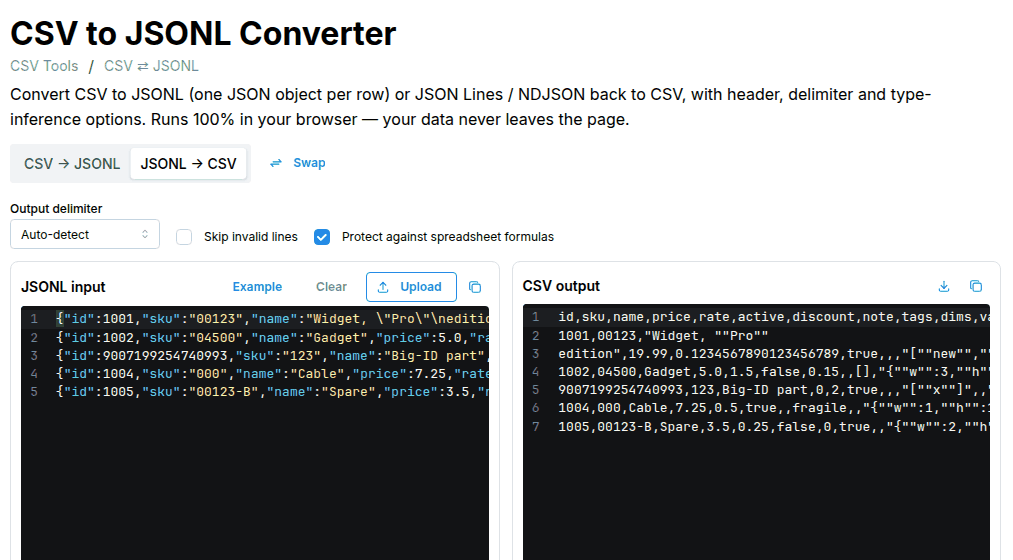
Compared cell by cell with the CSV from step 1, exactly 3 cells were different:
| Cell | JSON to CSV | JSON → JSONL → CSV |
|---|---|---|
Record 1 rate | 0.12345678901234568 | 0.1234567890123456789 |
Record 2 price | 5 | 5.0 |
Record 3 id | 9007199254740992 | 9007199254740993 |
Everything else was the same, including the empty cells, the JSON-in-cell nesting and the ' prefix. That separates two kinds of loss:
- Number precision was lost by the parser, not by CSV. A tool that reads numbers losslessly can write the exact digits into CSV.
nullversus missing versus"", real nesting, and types are lost by CSV itself. No CSV writer can keep them without adding its own convention, such as writingnullas text.
If you must go through CSV with large IDs, JSONL → CSV keeps the digits. Reading the CSV back with inference still turns the ID into a string, which is safer than a wrong number.
Type generation: what the generators inferred
Type generators don't change your data, but they decide what the data is allowed to be. From the same fixture:
export type Root = RootObjectItem[];

export interface Dims {
  w: number;
  h: number | null;
}

export interface Variant {
  color: string;
  stock: number;
  backorder?: boolean;
}

export interface RootObjectItem {
  id: number;
  sku: string;
  name: string;
  price: number;
  rate: number;
  active: boolean;
  discount?: number | null;
  note?: string | null;
  tags?: string[] | null;
  dims: Dims | null;
  variants: Variant[];
  contact?: string;
}
JSON to Zod produced the same shape: discount: z.number().nullable().optional(), dims: DimsSchema.nullable(), contact: z.string().optional(), and id: z.number().
JSON to JSON Schema produced a different answer for several fields:
| Field | What the fixture contains | TypeScript / Zod | JSON Schema generator |
|---|---|---|---|
id | integers, one above 253 | number | "type": "number" |
discount | null twice, missing once | optional and nullable | ["null", "number"], required |
note | null once, missing once | optional and nullable | ["string", "null"], required |
tags | null once, missing once, [] once | optional and nullable | ["array", "null"], required |
dims | null in record 3 | Dims | null | "type": "object" (null not allowed), required |
dims.h | null once | number | null | ["number", "null"] |
variants[].backorder | in one variant only | optional | not required |
contact | in record 1 only | optional | not required |
TypeScript and Zod kept optional (the key can be missing) and nullable (the key can be null) apart, and got both right for every field. The JSON Schema generator marked three fields as required even though record 3 or 5 doesn't have them, and didn't allow null for dims.
The generated schema also declares JSON Schema draft-04 in its first line:
"$schema": "http://json-schema.org/draft-04/schema#"
The site's JSON Schema Validator supports draft-07, 2019-09 and 2020-12, so it refused to compile the schema as-is:
no schema with key or ref "http://json-schema.org/draft-04/schema#"
After we deleted that one line, the validator checked the original fixture against the generated schema and reported 4 violations: missing discount, note and tags, and dims must be an object. The schema rejects the sample it was generated from, so review generated required lists and nullable types before you use them.
None of the three generators marked id as an integer or noticed that one ID was above 253. They can't: by the time they look at the data, JSON.parse has already turned it into 9007199254740992.
How to detect these losses
1. Diff the round trip, comparing numbers as text
Convert, convert back, and compare every value with the original by type and exact text. Read both sides with a lossless parser, otherwise the diff has the same blind spot as the converter. This is a shortened version of the script we used (Node.js with lossless-json):
import { parse, isLosslessNumber } from 'lossless-json';

// Describe a value by its JSON type and exact source text.
const describe = (v) =>
  v === undefined ? '(missing)'
  : isLosslessNumber(v) ? `number ${v}`
  : v === null ? 'null'
  : `${Array.isArray(v) ? 'array' : typeof v} ${JSON.stringify(v, (k, x) => (isLosslessNumber(x) ? `#${x}` : x))}`;

function roundTripDiff(beforeText, afterRecords) {
  const before = parse(beforeText);
  const changes = [];
  before.forEach((rec, i) => {
    const after = afterRecords[i] ?? {};
    for (const key of new Set([...Object.keys(rec), ...Object.keys(after)])) {
      const [a, b] = [describe(rec[key]), describe(after[key])];
      if (a !== b) changes.push(`record ${i + 1} ${key}: ${a} -> ${b}`);
    }
  });
  return changes;
}
Run on the step 3 output, it reported 30 changes, including:
record 1 rate: number 0.1234567890123456789 -> number 0.12345678901234568
record 1 discount: null -> string ""
record 2 tags: array [] -> string "[]"
record 3 id: number 9007199254740993 -> string "9007199254740992"
record 3 sku: string "123" -> number 123
record 3 discount: (missing) -> string ""
record 5 note: string "true" -> boolean true
This catches everything in the table above, but only if you still have the original to compare against.
2. Check numbers when you parse
Newer JavaScript engines pass a third context argument to the JSON.parse reviver, with the number's original text in context.source. Comparing it with the parsed value finds numbers that didn't survive:
function findLossyNumbers(text) {
  const findings = [];
  JSON.parse(text, function (key, value, context) {
    if (typeof value === 'number' && context?.source !== undefined && String(value) !== context.source) {
      findings.push({ key, source: context.source, parsed: value, safeInteger: Number.isSafeInteger(value) });
    }
    return value;
  });
  return findings;
}
On the fixture, in Chromium 145 and Node.js 24, it found three numbers:
| Key | Source text | Parsed | Number.isSafeInteger |
|---|---|---|---|
rate | 0.1234567890123456789 | 0.12345678901234568 | false |
price | 5.0 | 5 | true |
id | 9007199254740993 | 9007199254740992 | false |
price is only a formatting difference. The other two lost information. For integer fields such as IDs, Number.isSafeInteger(value) === false on its own is a useful alarm.
We only tested this in Chromium and Node.js. In an engine without context.source, the function silently finds nothing, so test for support first:
const hasSourceText = JSON.parse('1', (k, v, ctx) => ctx?.source) === '1';
If it isn't supported, parse with a lossless parser instead.
3. Validate against a schema you wrote
A schema written from what the data means, not generated from one sample, catches the type changes. Ours says id is an integer with "maximum": 9007199254740991, lists only the fields that are always present in required, and allows null where the data uses it.
In the JSON Schema Validator:
- Original fixture: 1 violation,
/2/idmust be <= 9007199254740991. The validator also parses withJSON.parse, so it saw9007199254740992. Over the limit either way, so the maximum still caught it. - After CSV to JSON: 40 violations, all of them type errors.
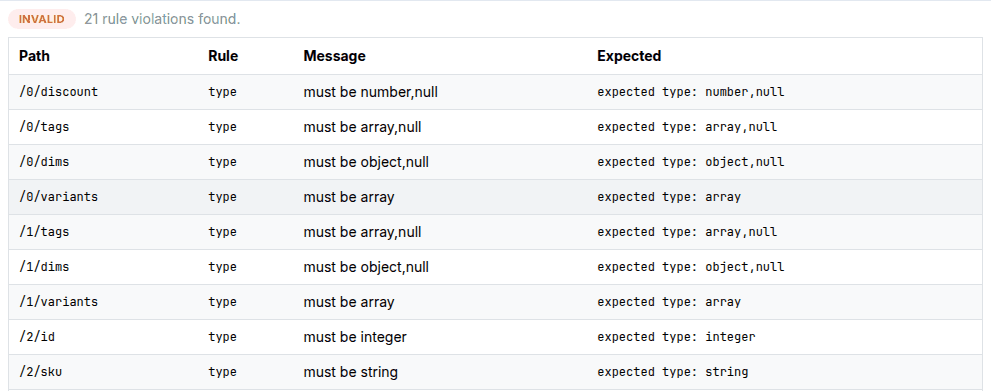
- After CSV to JSONL with inference: 21 violations, including
/2/idmust be integer,/2/skumust be string,/4/notemust be string or null, and the""values indiscount,tagsanddims.
What the schema didn't catch:
raterounded to 17 significant digits. It's still a valid number.'+1 555 0100. It's still a string.notechanging fromnullto"". The schema allows both.- Records 2–5 gaining
"contact": "". Also still a string.
A schema checks shape and type. It can't tell you a value changed if the new value is still allowed.
4. Tighten generated Zod schemas
We ran the generated Zod schema in Node.js 24 with Zod 4.5.4. It accepted the original fixture, holding the wrong ID 9007199254740992. It rejected the CSV to JSON output with 40 issues and the inferred output with 21. Changing one line made it catch the ID too:
id: z.int().positive(),
In this Zod version, z.int() only accepts safe integers, so the original fixture then failed:
2.id: Too big: expected int to be <=9007199254740991
A Zod check runs after JSON.parse, so like the schema, it can catch an ID that is over the limit but can't recover the right digits.
Limitations
- These results describe this site's converters on 10 November 2026, with their default options. Other converters may keep
null, parse nested JSON in cells, read numbers losslessly, or skip the'formula prefix. Test the tools you use with your own fixture. - One browser (Chromium 145), on a local development build. We didn't repeat the run in Firefox or Safari.
- We didn't open the CSV in Excel, Google Sheets or LibreOffice. What spreadsheets do with leading zeros, long numbers and the
'prefix isn't covered here. - Five records is enough to show each behaviour, not to measure how often it happens in real data.
Try it yourself
- Open the fixture in JSON to CSV and look at record 3's
id. - Paste the CSV into CSV to JSON and CSV ⇄ JSONL, and compare the outputs with the table above.
- Open the contract schema and fixture in the JSON Schema Validator to see the
/2/idviolation.
Related guides:
- How to compare JSON ignoring key order, which shows the same 253 problem in a diff
- Handling null values and defaults in jq
- Profile CSV and JSON files without uploading them